 How do I specify multicast address(es) for the DM-NVX-350/351 (C) transmitters in my project?
The Crestron® DM-NVX-350/351 (C) is a compact video encoder/decoder designed to function as either a transmitter or receiver. It has the ability to switch between the two modes programmatically via commands from a Crestron control system. DM-NVX-350/351 (C) features simple web-based control and management, USB and KVM integration, and support for copper and fiber LAN connectivity.
In Crestron Studio® the DM-NVX-350/351 (C) devices are represented by separate receiver and transmitter device models. When starting to plan a system project which will be created in Crestron Studio® and includes DM-NVX-350/351 (C) it is useful to know beforehand how many of them will be used as receivers and how many will be used as transmitters.
How do I specify multicast address(es) for the DM-NVX-350/351 (C) transmitters in my project?
 The multicast address (and other settings) of DM-NVX-350/351 (C) can be configured via the Web configuration interface. To do so follow the steps below:
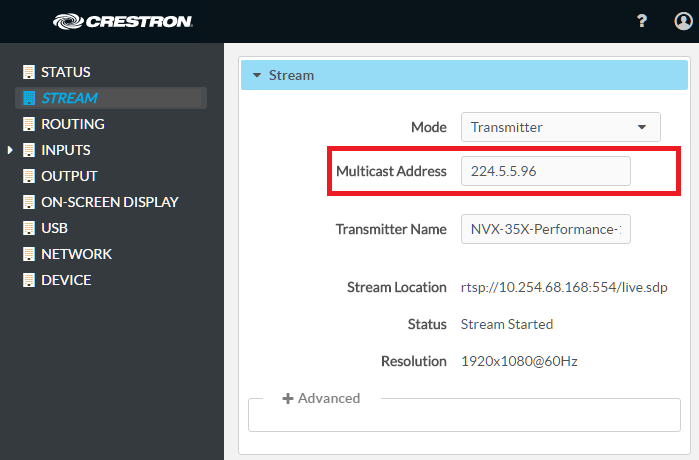
I plan to use two (2) DM-NVX-350/351 (C) configured as receivers and two (2) DM-NVX-350/351 (C) transmitters in my project. What do I have to do in Crestron Studio®?
It's easy. Just locate the DM-NVX-35x(C) devices in the Product Browser, either by using one of the Crestron built-in views and scrolling through the list of available devices, by typing 'dm-nvx' search string in the Search field or by a combination of both methods.
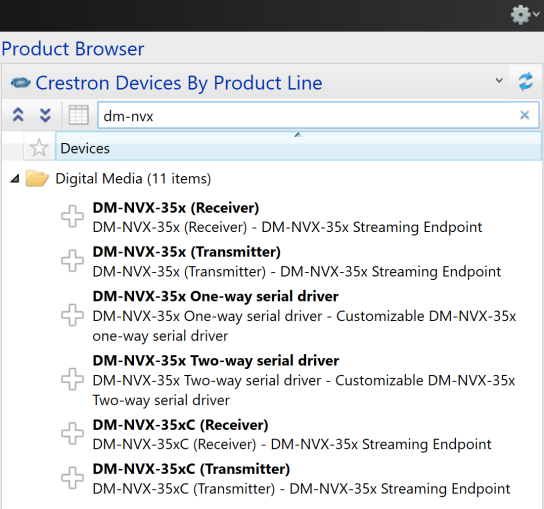
The DM-NVX-35x(C) receiver device model is named DM-NVX-35x(C) (Receiver) and the transmitter device model is called DM-NVX-35x(C) (Transmitter).
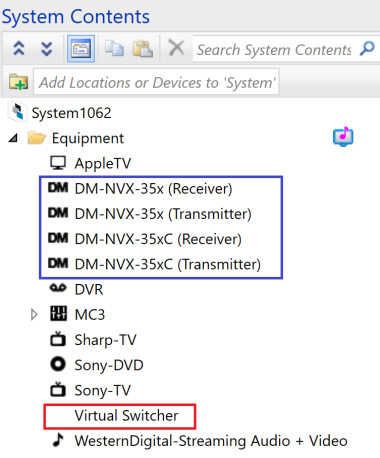
Add the desired number of DM-NVX-35x(C) (Receiver) and DM-NVX-35x(C) (Transmitter) devices. Crestron Studio® will automatically add a Virtual Switcher logic device which has to be used when connecting DM-NVX receivers and transmitters in Source Routes.
Example of system project containing one of the following: DM-NVX-35x Receiver, DM-NVX-35xC Receiver, DM-NVX-35x Transmitter and NVX-35xC Transmitter. The Virtual Switcher logic device added by Crestron Studio® is outlined in red:
.
How can I use DM-NVX-350(C) transmitters and receivers to route my source(s) to multiple TVs in the same or different rooms ?
You will need to connect a DM-NVX-350/351(C) transmitter to multiple DM-NVX-350/351(C) receivers. In Crestron Studio® the connection between DM-NVX-350/351(C) receivers and DM-NVX-350/351(C) transmitters needs to go through the Virtual Switcher.
To do so, simply follow the steps below:
Example of Source Routes configuration containing DM-NVX-35x(C) transmitter connected to multiple DM-NVX-35x(C) receivers:
